In May 2023, it was peak chat, when every product in the industry was spawning a message panel on its right edge. An interface researcher at GitHub, Amelia Wattenberger, published a short essay with a title built for the moment: Why Chatbots Are Not the Future.
Her argument came from lived experience: she was building AI interfaces for a living, on Copilot for Docs. It was a craftsperson’s complaint about a specific tool: a text box affords everything, which means it affords nothing. Good tools, she argued, make it clear how they should be used: a hammer’s weight tells your hand what it’s for, while an empty input strip tells you nothing about what the system can do, what it can’t, or how to ask. And she put her finger on the exact problem where chat goes from charming to exhausting:
Natural language is great at rough direction: teleport me to the right neighborhood.
But once you’re in the neighborhood, you don’t want to describe the house. You want to point at it. You want a doorknob.
Two years on, her essay reads less like dissent and more like a spec the industry hasn’t shipped yet. Most AI features in most products, including mine and, I’d bet, some of yours — are still chat panels because nobody ever held the design argument about what could be different.
Chat is the cheapest pattern to ship: one input, one stream, zero information architecture. The mental-model article in this series quoted Maggie Appleton as calling the chatbot the “lazy solution” back in 2023. Ian Silber, Head of Design at OpenAI, called out the “blank-box problem,” dismissing the chat box as a “glorified terminal” in a recent interview on Lenny’s podcast.
This article expands on why, in a working session that follows through on that insult. Because the actual design question was never chat or not chat. It’s which task is this surface for, and what is the right criteria to start this design discussion from.
The empty text box is a tool full of questions
Start with why chat keeps winning fights it should lose, because the reasons are seductive.
Chat is universal. It follows through on any intent, any phrasing. It’s also very forgiving — no wrong clicks, no hidden menus. And it demos like a dream, because in a demo the presenter already knows the magic words. What the demo never shows is the blank-box problem without context: the user staring at the cursor, holding all the interface’s burden themselves.
What can this do?
Where should I start?
What if I make a mistake?
Every scrap of context the product could have expressed as a control: what kind of output, for what audience, in what tone, within what bounds has to be typed, remembered, and retyped, per request, every. damn. time. Wattenberger’s prescription was to bake that information into the interface. Build controls for the specifiable parts, and use language for the open-ended parts — instead of making users hack it into every prompt.
Silber called out OpenAI’s Writing Blocks feature:
You can ask it to write a letter or email, and it now contains a block that you can directly manipulate. You can type with it, and you can brainstorm, and you can edit little bits and parts of it. [Then] you can copy just that.
Wattenberger’s second observation goes deep into the design work. Craft alternates between two modes: doing the work and stepping back to judge it. Good tools let you choose when to switch. Chat forces the switch on every turn:
type (to implement)
read (to evaluate)
type, read, type, read, type, read, type, read…
That monotonous routine is why long chat sessions feel exhausting in a way that an hour of canvas work doesn’t. There is no flow state in a turn-based conversation. When your users describe an AI feature as “powerful but tiring,” this is almost always why.
All of which makes chat a pattern (with a sweet spot, and with costs) rather than the paradigm. The paradigm shift, per Nielsen’s framing from earlier in the series, is intent-based interaction: users state outcomes, systems figure out steps. Chat is just one way to express intent, and often the weakest one available, because it’s too broad.
There’s an analogy from my childhood that I think holds true: chat is the DOS command line of the intent era: general, powerful, beloved by experts, and waiting for its GUI moment. We are the generation that gets to build the GUI moment.
It would be embarrassing to spend it polishing the prompt.
You aren’t short on patterns
Here’s what’s changed since Wattenberger’s essay, and why “chat is all we have” is no longer an excuse: the maps exist now.
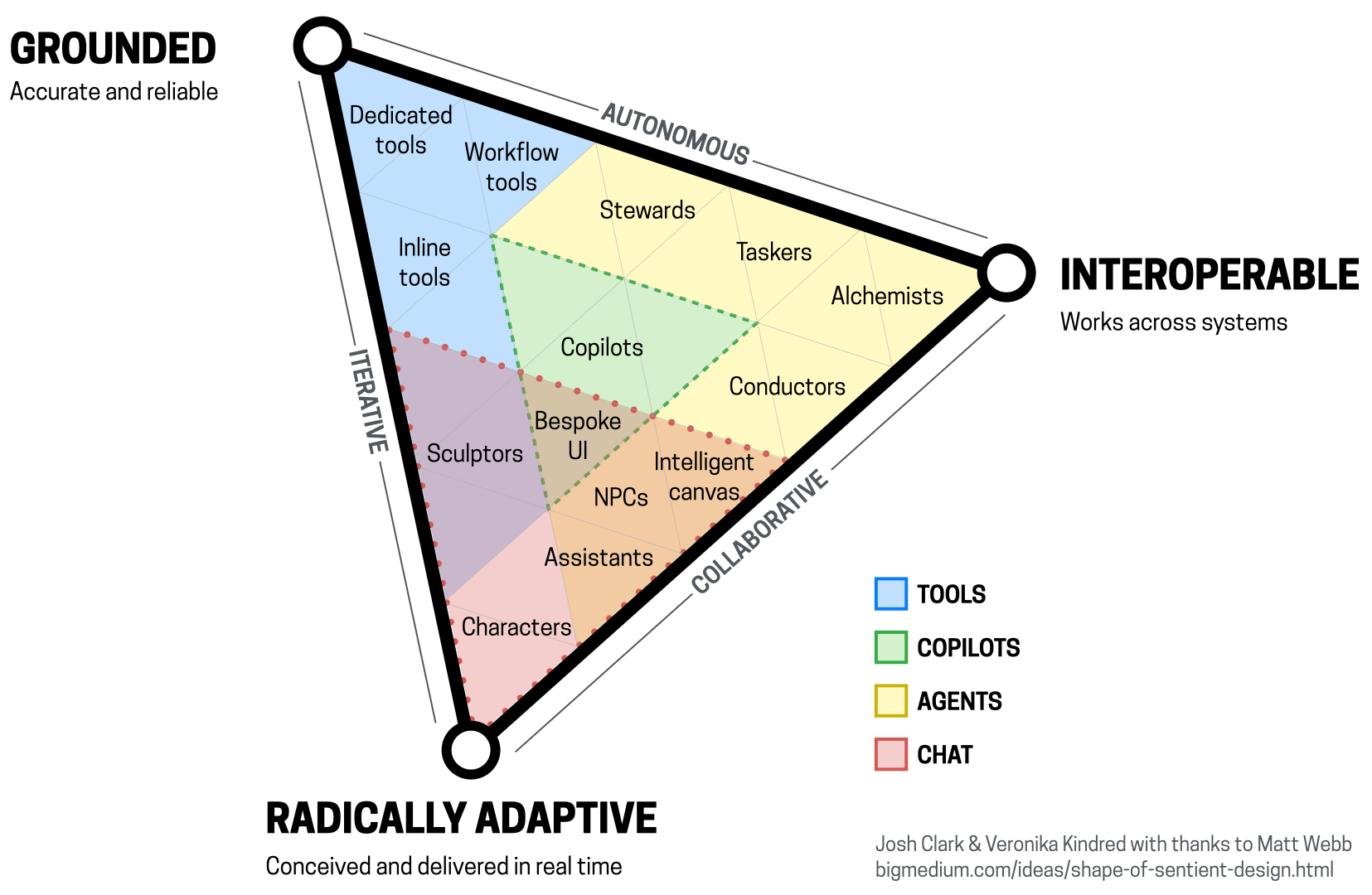
Josh Clark and Veronika Kindred’s Sentient Design framework plots AI experiences inside a triangle whose corners are:
- Grounded (the system has the context to be reliable)
- Interoperable (it can exchange data and instructions with other systems)
- Radically adaptive (it reshapes itself to the moment).
Within that space they position distinct archetypes (tools the user wields, copilots that work alongside, agents with autonomy over approach, and chat as peer conversation) as different placements with different demands, not interchangeable skins. The point of the diagram is what I’m advocating: locate the experience you’re building, then choose the patterns that placement requires.
And Emily Campbell’s Shape of AI has done the parts-bin work one level down. Six pattern families:
- Wayfinders (helping users construct their first ask)
- Inputs
- Tuners (parameters, filters, preset styles, modes, the specifiable parts, made into controls)
- Governors (action plans, draft mode, variations, verification, human oversight as interface)
- Trust builders
- Identifiers

Her framing for the whole catalog is practical and useful: “Our interfaces may evolve, but the foundations of great design are more relevant than ever.”
Silber emphasized that ChatGPT is focusing on adaptive interfaces that understand a user’s intent:
If you come at this as a designer, maybe ChatGPT should look different, have different affordances; or as a data scientist, or you’re using this to run your home for your personal life. [We] understand the context and provide different affordances… understanding the context and giving you different affordances based on that is… the vision and future of where [the interface will go].
So the vocabulary exists, the catalogs exist — and yet the chat panel keeps shipping, because pattern selection isn’t happening as a design activity. It happens by default, at the roadmap level (“add an AI assistant”), before a designer ever touches the problem. Resourceful PMs will even identify the pre-built UI library they want to use to shortcut their feature to launch.
Designers start within the wrong constraints.
The fix gets back to design’s roots, where we disrupt roadmaps, ask hard questions — and it starts with a question crude enough to survive a sprint with your ambitious PM: what verb is this surface for?
Four verbs that want four different interfaces
Nearly every AI-assisted task your users perform is dominated by one of four verbs: query, create, modify, refine. Each verb wants different affordances. (There’s a fifth verb, delegate, that gets its own articles later in this article series. I’ll place it in the matrix, but we’ll save it for later.)
Query
“I want to know something.” The user can state the question. What they need back is an answer they can check. The key affordances are retrieval-oriented: a clear ask, a cited answer, follow-up paths that don’t require re-typing context.
This is where trust builders do the heavy lifting: sources, confidence, scope-of-knowledge. The tell that you’ve mispatterned a query surface as open conversation: users re-asking the same question in different words, prompt-roulette style, because nothing in the interface tells them whether a better phrasing exists or the system simply doesn’t know.
Create
“I want something that doesn’t exist yet.” Intent is fuzzy at the start. This is chat’s home turf, the “teleport me to a neighborhood” move. But only the first move. The specifiable parts of a creative brief (format, audience, tone, length, style) are Tuner territory. Parameters, examples, and preset styles beat prose restatement every single time. And exploration wants *variations, the parallel options to react to, not a single stream to argue with.
This interface mismatch is why so many image generators yield frustration and capitulation, or reliance on YouTube influencers who claim to have the secret recipes (“type ‘my secrets’ in chat, and I’ll send you my prompts — along with a pitch for a $300 course”).
The tell: prompt scratch pads. When your users maintain personal spellbooks of magic phrasings, they are compensating, manually, for controls you didn’t build.
Modify
“Change this existing thing.” The object already exists, which creates immediate context: selection plus command beats description, always. Nobody should ever type “the third panel, in the right column, with the blue button that says Update Status” or “the third paragraph, the one about pricing” when they could just select it.
The affordances are direct manipulation plus a scoped instruction, a preview of the change, and diff-style accept/reject. This is draft mode, in Shape of AI’s vocabulary. Photoshop’s generative fill does this well: select the region, say the thing, judge the result in place.
The tell that a modify surface is mispatterned as chat is the copy-paste tax: users hauling content into the chat window and hauling results back out. Every paste is a small tell for a pattern mismatch.
Refine
“It’s almost right. Steer it.” The most common verb in real creative work, and the one chat serves worst. Refinement is continuous and relative — warmer, shorter, more like this one, less corporate. It’s continuous-but-relative adjustment is what sliders, knobs, and paired-direction handles were invented for.
Wattenberger’s essay literally sketches these. Typing “make it about 20% more playful” into a text box is using words to impersonate a slider, with none of a slider’s reversibility or feel. Regenerate with one constraint, branch comparisons, vary-subtle/vary-strong: these are refine affordances.
The tell: transcripts full of micro-adjustment turns, the implementation/evaluation loop flow nowhere to be found.
Run your own products through those four tells and I suspect you’ll find what I keep finding: the chat panel isn’t one design decision. It’s four different unmade decisions wearing a trench coat.
The pattern-selection matrix
Run each AI surface (existing or proposed) against it in crit. The question sequence: which verb dominates this surface? Then read across.
| Task verb | What the user can specify upfront | Lead with | Support with (Shape of AI names) | Chat’s proper role | The tell you chose wrong |
|---|---|---|---|---|---|
| Query | The question, usually well | Ask → cited answer | Wayfinders (suggested asks), Trust builders (sources, confidence, scope) | Follow-up clarification on the answer | Users rephrase and retry the same question. Answers can’t be verified in place |
| Create | Format, audience, tone, constraints (more than you think) | Structured brief: controls for the specifiable + open field for the rest | Tuners (parameters, preset styles, modes), Governors (variations) | The opening rough direction — the teleport | Influencer prompt guides, personal spellbooks, one output stream instead of options |
| Modify | The exact target, by pointing | Selection + scoped command, preview in place | Governors (draft mode, verification), inline diff | Naming the change when it’s hard to point at | The copy-paste tax: “the third paragraph, the one about…” |
| Refine | The direction of change, relatively | Continuous controls: sliders, paired handles, modifiable | Governors (branches, variations), regenerate-with-constraint | Occasional odd asks the controls don’t cover | Long micro-adjustment transcripts, users typing adverbs at a text box |
| Delegate | The outcome, the bounds, the check-in points | Brief → plan → approval gates → progress → review | Governors (action plan, controls, memory), Trust builders | Negotiating the brief and handling exceptions | Users babysitting a stream instead of reviewing checkpoints — see the transparency and autonomy articles coming later in this series |
How to use these verbs:
- One surface, one dominant verb. If a surface serves two verbs — a create canvas with a refine loop, say: That’s two pattern decisions, made separately. “It does everything” is how you end up back at the empty text box.
- Chat is the escape hatch. Nearly every row keeps a role for language: the novel ask, the exception, the weird case. That’s correct: chat is a superb fallback, the relief valve for everything your controls didn’t anticipate. The argument is against chat as the default, not against its existence. Kill the escape hatch and you’ve built a different failure: a rigid form pretending the probabilistic world is enumerable.
- This matrix is a discussion tool, not a law. Its job is to force the sentence “this is a modify surface, so why is the primary interaction a message thread?” — and then to let a designer argue. An argued exception beats an unexamined default every time; that’s the same logic as the Persona Gate, pointed at interaction instead of identity.
Using this in your work
- Inventory your AI surfaces and label the dominant verb. Shipping and in-flight both. Thirty minutes with the matrix on screen. Surfaces that resist a single label are usually roadmap-level bundles (“the assistant”) that were never decomposed. Decompose them now, on paper, even if you can’t unship the bundle right now.
- Go find the copy-paste tax. Session recordings, support tickets, or five user transcripts per chat surface. Count: content hauled in and out, re-asked questions, micro-adjustment chains, prompt spellbooks. This is the evidence step. Skip it and the redesign conversation stays theological. An hour of transcript reading converts “I feel like chat is wrong here” into “40% of turns are users doing selection’s job with adjectives.”
- Split each chat surface’s traffic: conversation or workaround? For every category of thing users type, ask if this is real open-ended dialogue, or a workaround for a missing control? Sort into the two piles. The workaround pile is your backlog, prioritized by frequency.
- Redesign one surface the worst verb-pattern mismatch. Usually a modify or refine surface wearing a chat costume. Move the specifiable into Tuners, the oversight into Governors, keep the text field as the escape hatch, and instrument the before/after based on the tax metrics from step two.
- Here’s the thing that trips most teams up: Controls cost more design and engineering than a chat UI library, which is why the text box kept winning. Do one surface well instead of trying to fix everything.
- Adopt the shared vocabulary in specs and crit. “Wayfinder,” “Tuner,” “Governor,” “grounded,” “radically adaptive”. This shared language creates coordination. Add one line to your AI-feature spec template: Dominant verb, lead pattern, chat’s role, and the tell we’ll monitor. One line. It converts the default into a decision forever after.
We’re all in the neighborhood. Create your doorknob.
Back to Wattenberger’s neighborhood. Chat got us all teleported somewhere new; credit where it’s due to this now-ubiquitous interface. But your users are standing in front of the house now, and the products still asking them to describe the door are going to lose to the products that hand them the knob.
Query, create, modify, refine.
Four verbs, four interfaces.
The right choice presents the right controls.
Tools & Resources
- Why Chatbots Are Not the Future: Amelia Wattenberger — still the clearest short case against chat-as-default. The sliders and affordance sketches are ready-made discussion fodder.
- Lenny’s Podcast: Chatbots are not the final interface: OpenAI’s Head of Design on what’s next — the aforementioned interview with Ian Silber, Head of Design at OpenAI. Insightful and directionally pointing to where the frontier labs’ UX are headed.
- The Shape of Sentient Design: Josh Clark, Big Medium (and the Sentient Design book) — the triangle map and experience archetypes. The placement exercise pairs directly with the matrix.
- The Shape of AI: Emily Campbell — the pattern families (Wayfinders, Inputs, Tuners, Governors, Trust builders, Identifiers). The parts bin for your redesign.
- Language Model Sketchbook: Maggie Appleton — the original “lazy solution” critique plus sketches of what non-chat LM interfaces can look like.
- Generative UI and Outcome-Oriented Design: NN/g — where pattern selection heads once interfaces are composed at runtime.